Now Available on Android & iOS
7 Great Modules
24/7 Background Watch
Free To Get Started
Anchor Watch Active
🌊
HW 14:32 · 4.8m
Safe Clearance
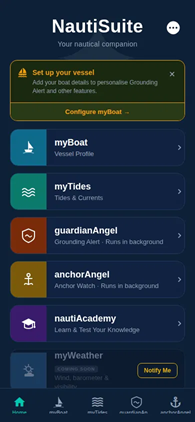
NautiSuite Home Screen
Scroll
Background monitoring — screen off
Real-time tidal data
Instant drag & grounding alerts
COLREGS maritime education

Real Scenarios. Real Solutions.

Here are just some of the ways NautiSuite works for you — on the water, at the mooring, and ashore.

anchorAngel
⚓ anchorAngel Peace of Mind at Anchor or on a Mooring
  • Mooring or marina peace of mind. You leave your boat on a mooring buoy or in a marina berth and want to be instantly notified if it moves for any reason — dragging, a failed mooring line, or if (heaven forbid) it was taken.
  • Overnight anchorage. You anchor in a sheltered bay for the night. Anchor Angel monitors your position while you sleep and wakes you the moment the boat drags beyond your set radius.
  • Anchoring in tidal streams. You anchor in a tidal area where the boat swings significantly. Set a custom watch radius that accounts for the swing, so you only get alerted if the boat actually drags. and get instant feedback about speed-over-ground (SOG) and course-over-ground (COG).
  • Leaving the boat unattended ashore. You go ashore for a meal or a walk and want confidence that if the anchor drags or a mooring fails, you'll know before the boat ends up on the rocks — even with your phone in your pocket. *requires a multi-device subscription
  • Storm or squall warning. A weather system passes through while you're at anchor. Anchor Angel runs silently in the background, screen off, and alerts you the instant the boat moves outside your safe zone.
myTides
🌊 myTides Planning Around the Water
  • Passage planning. You're planning a coastal passage and need to know the tidal window for crossing a shallow bar or transiting a tidal gate at the right state of tide.
  • Drying harbour entry. Your destination dries at low water. Use myTides to find the precise window when there's enough water to enter and leave safely.
  • Fishing or leisure timing. You want to be on the water at the optimal tidal state for fishing a particular mark, or simply want to time your trip to avoid a foul tide.
  • Checking conditions before departure. You glance at myTides each morning to see the day's tidal range, times, and heights at your home port before deciding whether to go out.
  • Kayaking, rowing and paddleboarding. Planning an evening on the water in a kayak, rowing boat or on a paddleboard? Know the tides before you go. Whether you're crossing a harbour mouth or paddling a tidal estuary, myTides tells you exactly what the water will be doing — so you stay in control and don't end up losing a fight with a foul tide.
launchWindow
🚤 launchWindow Slipway and Tidal Quayside Launching
  • Trailered boat on a tidal slipway. You tow your boat to a tidal slipway and need to know the exact window when there's enough water depth to launch and recover safely, based on your vessel's draught.
  • Tidal quayside access. You need to bring your tender or dinghy alongside a tidal quayside and want to know when the water level will be sufficient to do so without grounding.
  • Planning a day trip around the tide. You want to launch at a specific time and need to confirm the tide will be high enough — and that you'll be able to recover the boat before it drops again.
guardianAngel
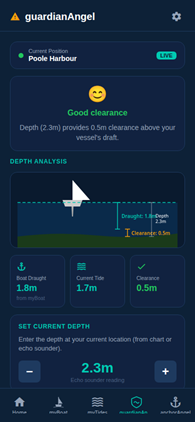
🛡 guardianAngel Safety and Grounding Alerts
  • Navigating shallow or unfamiliar waters. You're exploring a new anchorage or creek and want an alert if tide range might pose a risk of grounding. Drop anchor or pick up a mooring, enter the depth and get instant feedback.
nautiAcademy
📚 nautiAcademy Maritime Knowledge and Enrichment
  • Brushing up on the COLREGS. You're preparing for a day sail and want a quick refresher on the collision regulations — who gives way in which situation — before heading out.
  • Learning at your own pace. You're new to boating and use the bite-sized modules and quizzes to build your maritime knowledge gradually, tracking your progress and trying to beat your previous scores.
  • Keeping skills sharp over winter. Your boat is laid up for the season and you use nautiAcademy to stay engaged with seamanship topics so you're ready when the season starts again.
  • Sharing knowledge with crew. You challenge your crew to complete a quiz before a passage, making maritime awareness engaging and competitive.
  • Preparing for a recognised qualification. You're planning to take an RYA or similar course and want to arrive with the theory already second nature. nautiAcademy builds instinctive responses, maximising your chances of success and value for money.
NautiSuite home
⚓ All Modules The Complete Picture
  • All-in-one boat management. Rather than juggling separate tide apps, anchor alarm apps, and navigation tools, you have everything in one place — your complete nautical companion.
  • No account needed to get started. Download the app and immediately start using the free tier without registering — the lowest-friction way to get tidal data and an anchor watch on your phone.
  • From liability to go-to person. Rapidly advance from liability status to go-to person for all things nautical and important — with the knowledge, awareness, and tools to back it up.
Get it on iPhone & Android
Free to start  ·  No account required  ·  Upgrade anytime

Everything You Need on the Water

NautiSuite brings together six essential tools every sailor and boater needs, in one beautifully designed app.

myBoat

Your Vessel, Perfectly Configured

Set up your vessel profile with draught, beam, and slipway details. NautiSuite uses your boat's exact dimensions to personalise launch and landing windows for your tender, plus anchor watch alerts — with event-relevant notifications delivered via push notification or WhatsApp, so every alert reaches you even if ashore.

Vessel profile & dimensions Slipway configuration Personalised alerts 📩 WhatsApp notifications
myBoat — vessel profile
myTides

Beautiful Tidal Data, Always at Hand

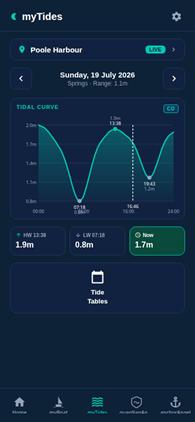
Stunning tidal curve visualisations with live high and low water times, heights, and tidal range. Select from hundreds of UK and international harbour stations. Springs and neaps clearly indicated so you always know the tidal state.

Live tidal curves High & low water times Multiple harbour stations Springs & neaps indicator
myTides — tidal curves
guardianAngel

Know Before You Ground

Intelligent grounding alert system that monitors water depth against your vessel's draught in real time. guardianAngel gives you clear visual depth analysis and instant alerts — so you always know when you have safe clearance, and when you don't.

Real-time depth clearance Vessel draught aware Visual depth analysis Background monitoring
guardianAngel — grounding alert
anchorAngel

Sleep Soundly at Anchor

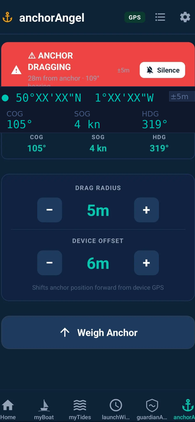
Set your drag radius and let anchorAngel watch over your vessel — even with the screen off. anchorAngel runs continuously in the background, monitoring your position and alerting you the instant your anchor starts to drag. Peace of mind, day and night.

Configurable drag radius Runs in the background Screen-off monitoring Instant drag alerts
anchorAngel — anchor watch
launchWindow

Never Miss Your Launch Window

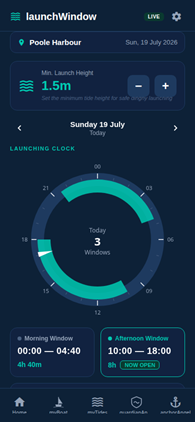
Calculates the optimal windows for launching or recovering your tender or dinghy from a slipway or tidal quayside, based on tidal height and your minimum launch depth. Morning and afternoon windows clearly displayed — so you plan your day around the tide, not the other way round.

Morning & afternoon windows Minimum height setting Daily launch clock Live status indicator
launchWindow — launch windows
nautiAcademy

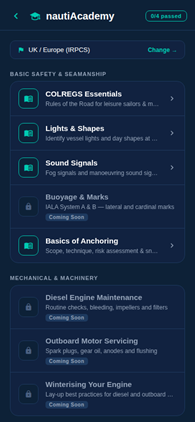
Learn the Rules of the Sea

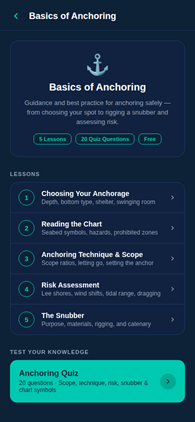
Structured lessons and interactive quizzes covering COLREGS, lights & shapes, sound signals, buoyage, and anchoring techniques. Whether you're preparing for your Day Skipper or brushing up on the rules, nautiAcademy makes maritime awareness engaging and accessible. Can you get the best score?

COLREGS essentials Lights & shapes Buoyage & marks Interactive quizzes
nautiAcademy — maritime education

Designed for the Sea

A dark, high-contrast interface optimised for use in bright sunlight and at night. Drag to explore all screens.

Exclusive Access for Subscribers

Access downloads, resources, tutorials and more — all in one place, tailored to your subscription tier.

📚

Tutorials & How-Tos

Step-by-step video and written guides to help you get the most out of every NautiSuite feature.

🔔

Alarm Sound Library

Download custom alarm sounds for your anchor drag alert. New sounds added regularly — paid subscribers only.

💡

Feature Requests

Submit ideas, vote on what gets built next, and track the status of your suggestions as they move through development.

🛟

Support

Raise a support ticket, attach a screenshot, and track your request through to resolution — all from your members dashboard.

Access Members Area →

Already a NautiSuite user? Register with your NautiSuite ID to get started.

Start Free, Upgrade Anytime

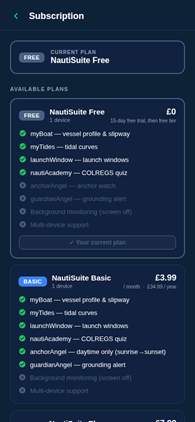
All core features are free. Upgrade for advanced monitoring, multi-device support, and unlimited notifications.

FREE
NautiSuite Free
£ 0
1 device · 15-day free trial, then free tier
  • myBoat — vessel profile & slipway
  • myTides — tidal curves
  • launchWindow — launch windows
  • nautiAcademy — COLREGS quiz
  • anchorAngel — anchor watch
  • guardianAngel — grounding alert
  • Background monitoring
  • Multi-device support
Get Started Free
BASIC
NautiSuite Basic
£ 3.99 / mo
1 device · £34.99/year
  • myBoat — vessel profile & slipway
  • myTides — tidal curves
  • launchWindow — launch windows
  • nautiAcademy — COLREGS quiz
  • anchorAngel — daytime only
  • guardianAngel — grounding alert
  • Background monitoring
  • Multi-device support
Get Basic
PRO
NautiSuite Pro
£ 9.99 / mo
Up to 3 devices, can add more · £65.00/year
  • myBoat — vessel profile & slipway
  • myTides — tidal curves
  • launchWindow — launch windows
  • nautiAcademy — COLREGS quiz
  • anchorAngel — full 24h monitoring
  • guardianAngel — grounding alert
  • Background monitoring (screen off)
  • Up to 3 devices, can add more + unlimited notifications
Get Pro

Subscriptions are managed through the App Store or Google Play.
Pricing is indicative and subject to change before launch. All core features remain free.

Ready to Set Sail?

Download NautiSuite free today and maximise your enjoyment, situational awareness, pleasure and time on the water. Available on iPhone and Android. No account required to get started.

myTides screen
Home screen
anchorAngel screen